Amazon EC2
Amazon Elastic Compute Cloud (Amazon EC2) is a web service for running virtual servers, called instances, in the AWS Cloud.
EC2 instances can run Linux, Windows, or macOS, depending on the selected instance type and Amazon Machine Image (AMI).
EC2 lets you provision compute capacity on demand, choose the CPU, memory, storage, and networking profile for the workload, and scale capacity up or down as demand changes.
EC2 is commonly used for web applications, development environments, batch processing, data processing, high-performance computing, and workloads that need direct control over the operating system.
Benefits of EC2 include:
- Elastic capacity - launch, resize, stop, start, or terminate instances as workload demand changes.
- Control - choose the operating system, instance type, storage, network configuration, and access model.
- Flexible hosting - select from many instance families optimized for general purpose, compute, memory, storage, GPU, and accelerated workloads.
- AWS integration - connect EC2 with services such as VPC, EBS, S3, IAM, CloudWatch, Auto Scaling, and Elastic Load Balancing.
- Reliability - design applications across Availability Zones and replace failed instances quickly.
- Security - run instances inside a VPC and control access with IAM, security groups, network ACLs, key pairs, and encryption options.
- Usage-based pricing - pay for the compute capacity and related resources you use.
Amazon Machine Image (AMI)
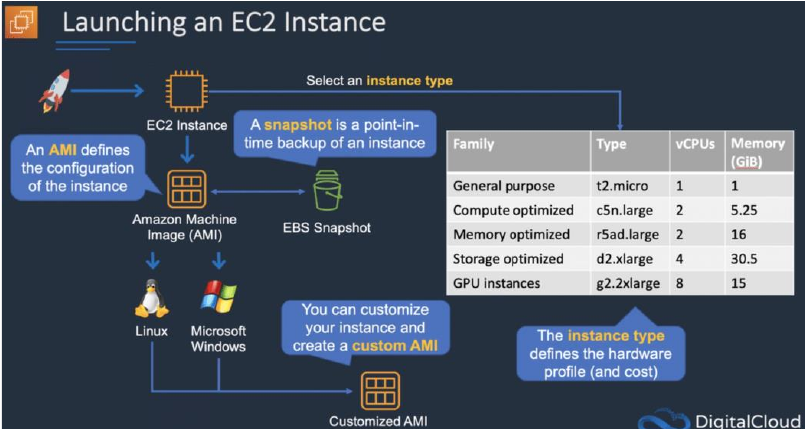
An Amazon Machine Image (AMI) is a template used to launch an EC2 instance.
An AMI includes:
- A root volume template, such as an operating system, application server, and applications.
- Launch permissions that control which AWS accounts can use the AMI.
- A block device mapping that specifies the volumes to attach to the instance when it’s launched.
AMIs come in three main categories:
- Community AMIs - public images shared by AWS users or communities.
- AWS Marketplace AMIs - images packaged with commercial, licensed, or supported software.
- My AMIs - custom images that you create and manage.
Metadata and user data:
- User data is supplied when an instance launches, often as a bootstrapping script.
- Instance metadata is information about the running instance that can be used for configuration or automation.
- User data is limited to 16 KB.
- User data and metadata are not encrypted by default.
- Instance metadata is available from the instance at http://169.254.169.254/latest/meta-data.
The Instance Metadata Query tool allows you to query the instance metadata without having to type out the full URI or category names.
EC2 Pricing
EC2 pricing depends on the resources you provision and how long you run them.
EC2 pricing is based on:
- Instance running time.
- Instance configuration.
- Instance type.
- Number of instances.
- Storage volumes.
- Load balancers.
- Detailed monitoring.
- Auto Scaling (resources created).
- Elastic IP addresses.
- Operating systems and software packages.
- Data transfer.
For broader AWS cost concepts, see AWS Billing and Pricing.
EC2 pricing options include:
On-Demand
On-Demand Instances let you pay for compute capacity without an upfront payment or long-term commitment.
Good for:
- Short-term workloads.
- Spiky or unpredictable workloads.
- Development and test environments.
- Applications that cannot be interrupted and do not yet have predictable usage.
Reserved
Reserved Instances provide a discount compared with On-Demand pricing in exchange for a usage commitment.
Good for:
- Steady-state or predictable workloads.
- Applications that need reserved capacity.
- Customers that can commit to a 1-year or 3-year term.
Reservation payment options include:
- No upfront.
- Partial upfront.
- All upfront.
Reservation types include:
- Standard Reserved Instances - largest discount, least flexibility.
- Convertible Reserved Instances - lower discount, but attributes can be exchanged for another reservation of equal or greater value.
Spot
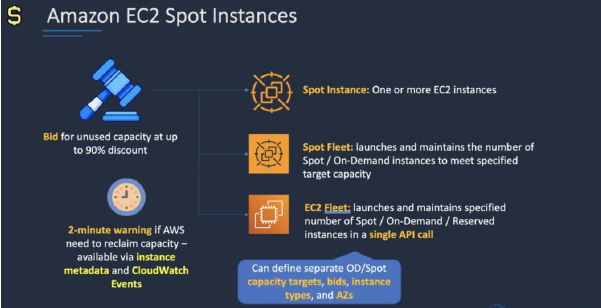
Spot Instances let you purchase spare EC2 capacity at discounted rates. AWS can interrupt Spot Instances when it needs the capacity back, so applications must tolerate interruption.
Good for:
- Fault-tolerant workloads.
- Batch jobs.
- Data processing.
- CI/CD workers.
- Flexible workloads with non-fixed start and end times.
- Workloads that are only economical at low compute prices.
Dedicated Hosts
Dedicated Hosts are physical EC2 servers dedicated to a single customer. They provide visibility and control over instance placement on the host.
Good for:
- Server-bound software licenses that use per-core, per-socket, or per-VM metrics.
- Regulatory or compliance requirements.
- Workloads that require physical host visibility.
Notes:
- Dedicated Hosts run in your VPC.
- Billing is per host.
- They are available On-Demand or with a Dedicated Host Reservation.
- They are typically the most expensive EC2 tenancy option.
Dedicated Instances
Dedicated Instances are EC2 instances that run in a VPC on hardware dedicated to a single customer.
Key points:
- They are physically isolated from instances that belong to other AWS accounts.
- They do not provide the same placement visibility and control as Dedicated Hosts.
- Billing is per instance.
- They may share hardware with other instances from the same AWS account.
- They are available as On-Demand, Reserved Instances, and Spot Instances.
Savings Plans
Savings Plans provide lower prices in exchange for a commitment to a consistent amount of compute usage, measured in dollars per hour.
Savings Plans can apply to:
- Amazon EC2.
- AWS Fargate.
- AWS Lambda.
Commitment terms are 1 year or 3 years.
EC2 Instance Types
Amazon EC2 provides a wide selection of instance types optimized to fit different use cases.
Instance types comprise varying combinations of CPU, memory, storage, and networking capacity and give you the flexibility to choose the appropriate mix of resources for your applications.
Each instance type includes one or more instance sizes, allowing you to scale your resources to the requirements of your target workload.
The table below summarizes common EC2 instance family prefixes:
| Family | Hint | Purpose/Design |
|---|---|---|
| D | Data | Dense local storage for data-heavy workloads. |
| R | RAM | Memory optimized workloads. |
| M | Main | General purpose workloads, such as application servers. |
| C | Compute | Compute optimized workloads. |
| G | Graphics | Graphics-intensive and GPU-based workloads. |
| I | IOPS | Storage I/O optimized workloads, such as NoSQL databases and data warehouses. |
| F | FPGA | FPGA hardware acceleration. |
| T | Burstable | Low-cost, burstable general purpose workloads. |
| P | GPU | High-performance GPU workloads, such as machine learning and HPC. |
| X | Extreme memory | Large in-memory workloads, such as SAP HANA and Apache Spark. |
| U | High memory | Very large memory and bare metal performance for in-memory databases. |
| Z | High compute/memory | Fast CPU, high memory, and NVMe SSDs for high-performance workloads. |
| H | High disk throughput | HDD-based local storage for high-throughput workloads. |